Run Postman Tests on Travis CI
One of the great features of Postman is that it is really easy to integrate it with CI/CD tools like Travis CI, Jenkins, etc... In this post, we will take a look at how to run Postman tests on Travis CI.
Initial Setup
To get the tests running on Travis CI, you'll need to do some initial setup -
- Create a GitHub Repository and push collection and environment related files to GitHub
- Connect your GitHub repository with TravisCI
Creating .travis.yml file
Once GitHub and Travis is connected, you can focus on creating the Travis configuration file which will look something like this -
language: node_js
node_js:
  - '14.4.0'

install:
  - npm install newman

script:
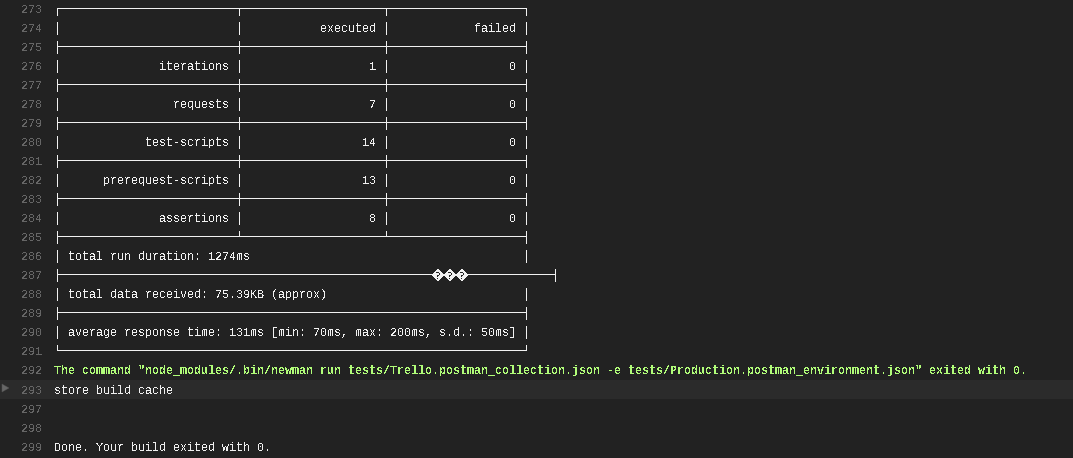
  - node_modules/.bin/newman run tests/Trello.postman_collection.json -e tests/Production.postman_environment.json
Once you push this file to GitHub, Travis will pick up the configuration file and start building your project and run all your tests in your collection.
Check out the video below to learn more about Postman Travis integration –
To learn about API Test Automation using JavaScript, check out my free tutorial series here –
JavaScript API Test Automation Tutorial Series
I hope this post helped you out, let me know if you have any questions in the comments below!
Happy testing!
Want to learn more?
Check out our courses to master test automation and advance your career.
Explore Courses