Postman Newman Tutorial
Postman provides the capability to run Postman Collections through the command line tool called Newman. In this post, we will do a quick tutorial on the Postman Newman tool.
What is Newman?
Newman is a command-line Collection Runner for Postman. With Postman, you can run collections in two ways -
- With the Postman Collection Runner
- With the Newman tool
With Newman, it allows you to run and test a Postman Collection directly from the command line.
Since you can run the collections via the command line, you can also easily integrate it with your continuous integration servers and build systems like Jenkins, TravisCI, etc…
How to run a collection using Newman?
To run a collection using Newman, you need to export the Postman collection and then pass that collection name and address to the Newman CLI. Example run command -
newman run tests\Trello.postman_collection.json -e tests\Production.postman_environment.json
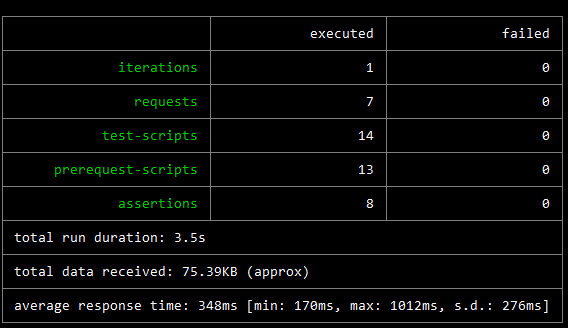
Running the Newman run command will generate a basic tabular CLI report -
Check out the video below to learn more about Newman CLI tool –
To learn about API Test Automation using JavaScript, check out my free tutorial series here –
JavaScript API Test Automation Tutorial Series
I hope this post helped you out, let me know if you have any questions in the comments below!
Happy testing!
Want to learn more?
Check out our courses to master test automation and advance your career.
Explore Courses