Postman File Upload (Image & Video)
In this post, I will cover how to do file upload using Postman for both image and video. Postman makes it really easy to do file uploads with the help of form-data. Let's take a look at that -
For this post, I will be using Imgur API (you are free to use any API that supports file upload). So here are the following things we need to successfully upload the file using Postman -
- API: https://api.imgur.com/3/upload
- HTTP Method: POST
- Authentication: depending on the API
- Body: form-data
Check out the video below to learn how to upload file using Postman:
- As part of form-data, you will need to provide the necessary key-value
- For key, change it from text to file and you will see 'Select Files' as a value
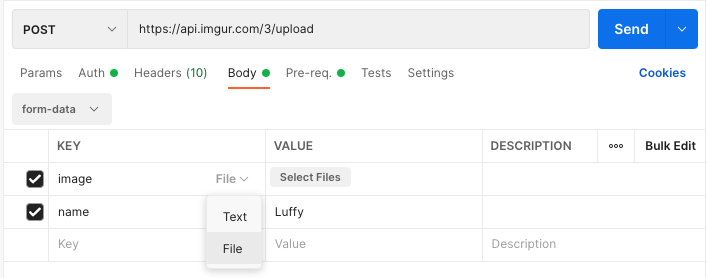
Postman Select File
- Upload the file by clicking on 'Select Files'
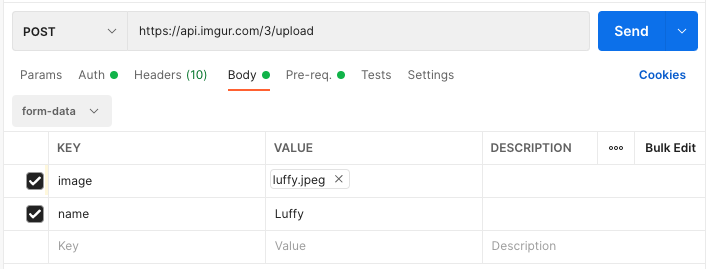
Imgur API File Upload
Once the file is upload, simply hit 'Send' and you should see a successful response (2xx).
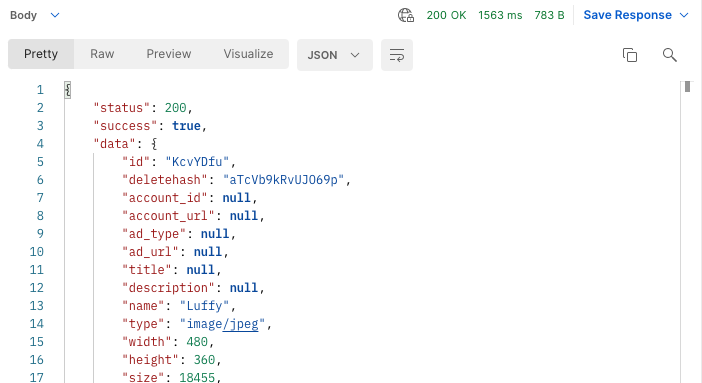
File Upload Response
Video Upload
Similarly, you can upload a video or any other file type as well, if the API supports it.
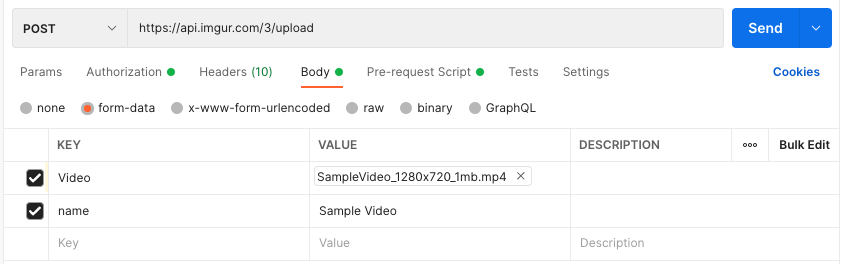
Video Upload using Postman
That's all there is in terms of file upload using Postman. As I said, Postman makes it really easy and straightforward to upload file.
If you are interested in learning more about Postman, check out this Postman playlist -
Want to learn more?
Check out our courses to master test automation and advance your career.
Explore Courses